FixYourVPN
If Prime Video has stopped working with your VPN, you're not alone. Prime Video checks both your IP address and your DNS requests to work out where you are. That's why a server switch alone sometimes isn't enough: the IP looks right but the DNS is still giving away your real location. The good news is that both are fixable, and most people are watching again within a few minutes.
What you need to know
Prime Video (included with an Amazon Prime membership) uses those two checks to spot VPN traffic. If either one points to a location that doesn't match, you'll see something like "This title is not available in your current region" or "Prime Video isn't available in this location."
One thing that trips people up: your content library is partly determined by the country your Amazon account was created in, not just your VPN server location. Amazon Originals (The Boys, Reacher, Fallout, The Rings of Power) are available in every country where Prime Video operates. Third-party licensed content varies by territory. To access the full US library, you need both a US VPN server and a US Amazon account. A UK account on a US server gives you a mix of content, but not the complete US catalogue.
Prime Video is generally less aggressive about blocking VPNs than BBC iPlayer. Most problems clear up after a quick server switch.
Fix 1: Switch to a different server
Amazon keeps an updated list of blocked VPN IP addresses, so a server that worked last month may now be flagged. If you're seeing an error or your library doesn't match your target region, switch to a different server in the same country and try again. Test two or three before moving on to other fixes.
In NordVPN, open the server list and look for servers marked with a streaming icon, or search for your target country and pick a different numbered server. In ExpressVPN, tap Choose Location, select your country, and try a different city. Both refresh their server IPs regularly, which is why they hold up better than smaller VPNs with Prime Video.
Amazon Originals are the same in every country; Prime Video holds worldwide rights on those. Third-party licensed films and shows are different: Amazon rents those rights territory by territory, which is why switching to a US server changes the catalogue but doesn't unlock everything.
Fix 2: Clear cookies and use a private window
If you've used Prime Video before without a VPN, your browser may have saved location data from that visit. Open a private or incognito window after connecting your VPN to start clean. If that alone doesn't fix it, clear Prime Video's cookies using our full cookie-clearing guide, or follow the steps below for your browser.
- Chrome: go to Settings > Privacy and security > Clear browsing data, set the time range to All time, and tick Cookies and other site data.
- Firefox: open Settings > Privacy & Security > Clear Data and tick Cookies.
- Safari: go to Safari > Settings > Privacy > Manage Website Data > Remove All.
- Edge: go to Settings > Privacy, search, and services > Clear browsing data > Choose what to clear and set the time range to All time.
Once done, reconnect your VPN and open Prime Video in a fresh private window.
Fix 3: Confirm Prime Video is seeing the right location
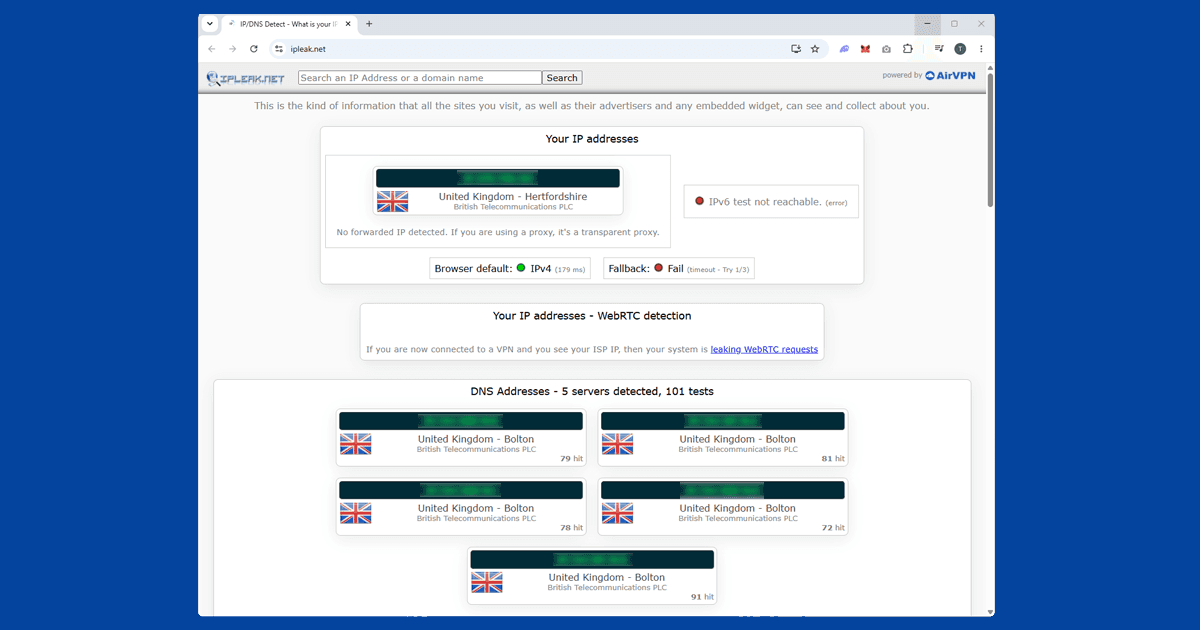
Before trying anything more involved, open our IP address checker with your VPN connected. It shows what your connection looks like from the outside. If it shows the right country, your VPN is working fine and something else is causing the problem. If it shows your real location, try a different server. If several servers all show the wrong location, your VPN provider may not have strong enough coverage for Prime Video. Our VPN reviews cover the options that work consistently.
Fix 4: Use the Prime Video app
If the website isn't working with your VPN, try the Prime Video app on your phone or tablet. The app and the browser version can behave differently with the same VPN connection, so it's worth the swap. On mobile, make sure you're using the full VPN app rather than a browser extension. A browser extension only covers your browser: the Prime Video app runs separately and won't be protected by it.
If you only want Prime Video to go through the VPN and leave everything else on your normal connection, use split tunneling. In NordVPN: open Settings > Split Tunneling and add the Prime Video app to the VPN-only list. In ExpressVPN: go to Preferences > General > Split tunneling and select Prime Video. Note: split tunneling is not available on iOS due to Apple's platform restrictions. On iPhone, run the full VPN connection instead.
Fix 5: Watching Prime Video on a smart TV
Most smart TVs don't support VPN apps directly, so the approach depends on your device.
Fire TV Stick: the simplest option. Install your VPN app directly from Amazon's app store, connect to your target country's server, and open Prime Video normally. NordVPN and ExpressVPN are both available on Fire TV.
Samsung, LG, and Sony smart TVs: no native VPN app support. Your two options are to set up the VPN on your router (all devices on the network, including the TV, go through the VPN) or share a VPN connection from a laptop or PC as a wi-fi hotspot and connect the TV to it.
Roku and Chromecast: no native VPN app support either. Set the VPN up on your router, or use a laptop running the VPN as a wi-fi hotspot and connect the Roku or Chromecast to that.
Which VPN works best for Amazon Prime Video
NordVPN is the most consistent performer with Prime Video in our testing. It has a large server network with frequent IP rotation, which helps it stay ahead of Amazon's blocked server list. In the server list, look for servers marked with a streaming icon: those tend to work best for video. Its NordLynx protocol (built on WireGuard) is fast enough for 4K streaming without buffering.
ExpressVPN is the strongest alternative, particularly for less-common server locations. Its Lightway protocol keeps speeds high. If you get stuck, ExpressVPN's support team can usually point you to a server that's currently working with Prime Video.
Free VPNs are almost always blocked by Prime Video. Their small server pools get flagged quickly and rarely get refreshed. If you're on a smaller paid VPN and hitting repeated blocks, switching to either of the providers above is the most reliable fix.
What's on Amazon Prime Video
Prime Video has a large catalogue, though exactly what's available depends on where you are.
- Amazon Originals: available in every country where Prime Video operates. Includes The Boys, Reacher, Fallout, The Rings of Power, and The Marvelous Mrs. Maisel.
- Licensed films and TV: varies by region. The US library is the largest. The UK, Germany, and Japan all have substantial catalogues with some exclusive licensed content.
- Prime Video Channels: add-on subscriptions to services such as BritBox, Paramount+, MGM+, and Acorn TV. Channel availability differs by country.
- Live sport: in the UK, Prime Video has held rights to some Premier League matches and tennis. In the US, it has a deal for Thursday Night Football (NFL). Sport rights change over time and vary by region.
- Rentals and purchases: films and shows available to rent or buy outside the subscription, accessible globally.