FixYourVPN

If your VPN isn't getting you into Hulu, you're not alone. Hulu is one of the harder streaming services to unblock: it's US-only and it actively works to keep out connections from other countries. The most common fix is switching to a fresh US server, but this guide covers everything else in order if that doesn't do it straight away.
Why Hulu is harder to unblock than most
Hulu is a US-only service with no international version. It blocks outside access by checking your IP address against lists of known VPN server addresses, and it updates those lists more frequently than most services. A server that worked last week can stop working without any change on your end.
Paid VPNs with large US server pools do get through consistently enough, but you may need to try a few servers to find a clean one. NordVPN and ExpressVPN tend to be the most reliable because they maintain large US networks and cycle through blocked IPs quickly. Free VPNs rarely work: their small IP pools get flagged fast and stay flagged.
Watching Hulu originals from the UK on Disney+
If you're in the UK and looking for a specific Hulu original show, it's worth checking Disney+ first before setting up a US VPN. Disney owns both services, and many Hulu originals have been added to Disney+ in international markets including the UK. Shows like The Bear and Only Murders in the Building are among those that have appeared on Disney+ UK without needing a VPN at all.
If the show you want is already on Disney+ UK, that's the simpler route. A US VPN and US Hulu account is still what you need for the full Hulu catalogue: live TV, local channels, and titles that haven't made it to Disney+ internationally yet.
You need a US Hulu account
Hulu isn't free: it requires a paid US subscription, and signing up typically needs a US payment method. If you're outside the US and setting up for the first time, a virtual US prepaid card is the most common approach for getting a US billing address. Once you have an account, the challenge is purely about finding a US VPN server with a clean IP address.
Hulu's terms of service restrict access to users in the United States. Using a VPN to watch from abroad falls outside those terms.
Switch to a different US server
If Hulu is showing a location error, try a different US server. Hulu updates its blocked VPN server list more often than most services, so the server you used last time may have been added to the blocked list since. Try a few different cities: New York, Los Angeles, Chicago, and Miami are all good starting points, since IP ranges vary between cities and what's blocked in one may be clean in another.
Our guide to switching VPN servers walks through the steps in all the main apps. If you're working through several servers without luck, a VPN with a larger US network will give you more options.
While you're in your VPN settings, it's also worth enabling the kill switch. If your connection drops while you're watching, a kill switch cuts your internet rather than falling back to your real IP, which would immediately trigger a Hulu location check. Our kill switch guide shows how to enable it in the main apps.
Clear cookies and use a private window
If you've visited Hulu before without a VPN active, your browser may have stored session data that includes your real location. Even with a VPN connected, those cached cookies can cause a block. Open a private or incognito window after connecting your VPN to start fresh. To clear cookies manually:
- Chrome: SettingsPrivacy and securityClear browsing data
- Firefox: SettingsPrivacy & SecurityClear Data
- Safari: SafariSettingsPrivacyManage Website DataRemove All
- Edge: SettingsPrivacy, search, and servicesClear browsing data
Then reconnect your VPN and reload Hulu.
Confirm your VPN is showing a US location
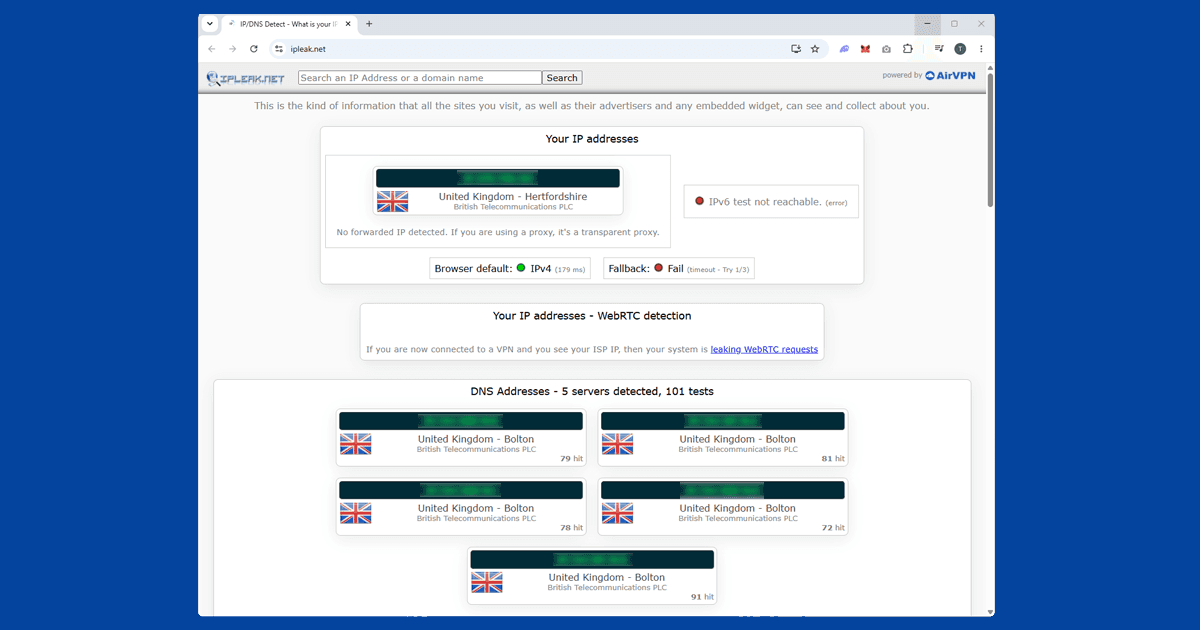
It's worth quickly checking your VPN is actually routing you through the US before trying anything more involved. Use our IP address checker with your VPN on: if it shows a US location, the VPN is working and the block has a different cause. If it shows your real location, try a different US server. If multiple servers all show the wrong location, it may be time to switch to a VPN with a larger US network. See our VPN recommendations.
Check for a DNS leak
Hulu checks DNS requests alongside IP addresses, so a DNS leak can trigger a block even when your IP address looks correct. A DNS leak means your device is sending DNS requests outside the VPN tunnel, which reveals your real location through a different channel. Hulu is strict enough that even a partial leak can cause a block.
Our IP checker also shows DNS information: if it shows your ISP's DNS instead of your VPN's, you have a leak. In NordVPN, DNS leak protection is on by default. In ExpressVPN, check under Preferences for "Use only ExpressVPN DNS servers while connected." Our full guide to fixing a DNS leak has the step-by-step for each app.
Change your VPN protocol
If you've switched servers, cleared cookies, and fixed any DNS leak and Hulu is still blocking you, try switching your VPN protocol. WireGuard is faster and more reliable than older protocols, and some users find it gets through when other protocols don't. In NordVPN, WireGuard is called NordLynx. In ExpressVPN, look for Lightway, which is ExpressVPN's own fast protocol.
If WireGuard doesn't help, try OpenVPN TCP, which runs on port 443 (the same port as regular HTTPS traffic) and can be harder for some detection systems to identify. OpenVPN UDP is a useful middle ground: faster than TCP but more broadly compatible than WireGuard on some networks. Our guide to changing your VPN protocol has step-by-step instructions for all the main apps.
Try the Hulu app instead of the browser
If the website keeps blocking you, try the Hulu app on iOS, Android, Fire TV, or Roku. The app can handle VPN connections differently, and a block that affects the browser doesn't always affect the app. On mobile, make sure your VPN is running as a system-level app rather than a browser extension: extensions only cover browser traffic and won't protect the Hulu app.
For smart TVs (Samsung, LG), consoles (PlayStation 4/5, Xbox), and Apple TV, you'll need to install the VPN on your router so the TV's traffic routes through a US server. Fire TV Stick and Android TV are the exception: you can install a VPN app directly on those devices and connect to a US server before opening Hulu.
Common Hulu error messages
Hulu's error messages can be hard to decode. Here's what the common ones usually mean:
- "Based on your IP address, we think you might be outside the US": the server IP has been flagged. Switch to a different US server and try again.
- Error P-EDU125: typically a geo-block. Clear cookies, switch server, and try a private window.
- Error RUNUNK13: a general playback error often associated with VPN detection. Try a different US server or switch protocol.
- "We're not able to load this page right now": can point to a DNS issue. Run a leak check and re-enable DNS leak protection before reconnecting.
- Error BYA-403-011: usually an account or payment issue rather than a geo-block. Check your Hulu account status directly.